




 Turkey (Türkçe)
 How to Complain about a Tweet?
While Twitter is gradually becoming the biggest social media site in the world, it is gradually increasing the negative shares as a result of the increasing number of people. If you are actively using Twitter, you may often see inappropriate posts. Shares need not be inappropriate. It may even be someone who bothers you, gives you the information you want to remain confidential about, or even imitates you. To complain about such Tweets, follow the steps below.
Do not complain about Tweet
First, press the down arrow button in the upper right corner of the tweet. Then select the report tweet line from the small page that opens.

Then you will come to the page where you will choose why the Tweet is disturbing and why you complain about it.
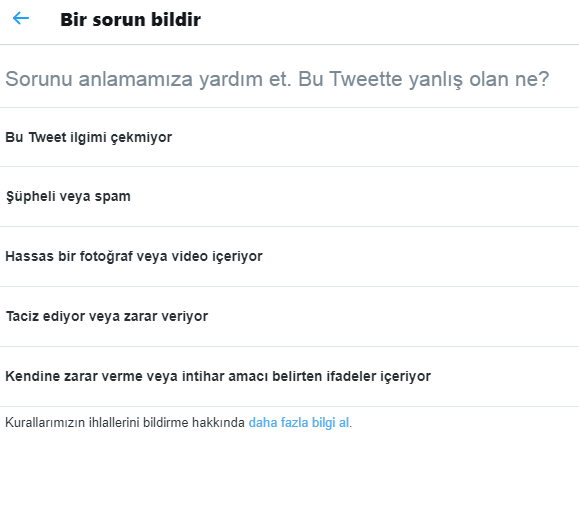
A page will be opened for you based on your choice here. For example, if you select the line that I am not interested in this tweet, only the Block this account option appears on the next page. Twitter does not make any control. But if you say he is harassing and hurting, he may ask you for details and check the tweet. If it doesn't really comply with publishing policies, it may block the account.
You will be notified about these transactions. If you do not want to come, you have to edit the option to report during the complaint. Make sure to complain about the content that can serve as a negative example for Twitter to become a more useful place.
Comments0
No Comments Yet
Be the first to share your thoughts.
Please sign in or sign up to leave a comment.