




 Turkey (Türkçe)
 Block Unwanted SMS
The short message is now a history, but unfortunately it has been recently used by many companies as an advertising medium. See getting your phone number caught. When you get your 1 spam company phone number, 10 different companies send you advertising messages. Are you tired of this situation? Then we will tell you the SMS blocking feature on Android. Although the model used is Xiaomi Mi6, this may be a little different due to the interface differences on Android. The logic is the same.
The things you need to do are;
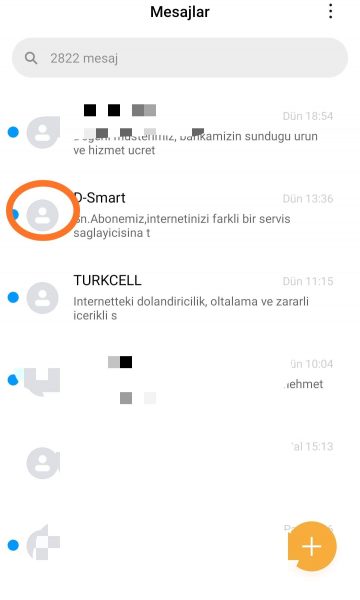
- Enter the Messages app.
- Click on the profile picture of the spam message you received here.
- Even if the number is not registered, this will take you to the number's profile.
- A little below the page, you will see the block button.
This method is always the same logic on Android. Images were taken on Mi 6. What does this process do? With this process, this number is not prevented from texting you. When he sends a message to you, his messages fall into blocked messages. So you don't see it.

Comments0
No Comments Yet
Be the first to share your thoughts.
Please sign in or sign up to leave a comment.